
Shortcuts:
Pay by invoice (manual invoicing)
How is my location determined?
All school plans are billed annually, however, monthly subscriptions are available for other segments (options may be limited).
What currencies do you operate with?
Based on your location, pricing will be in one of the following currencies:
| Location | Currency | Symbol |
|---|---|---|
| USA (+ rest of the world that isn't covered by the list below) | USD |
$ |
| Canada | CAD | $ |
| Australia | AUD | $ |
| New Zealand | NZD | $ |
| Europe (EU) | EURO | € |
| United Kingdom | GBP | £ |
| Norway | NOK | kr |
Currencies: USD ($), CAD ($), NOK (kr), GBP (£), EUR (€), AUD ($), or NZD ($).
Your billing options are determined when you start a subscription. If needed, you can contact us later on to change your chosen billing option, or to delete the payment details.
What payment methods do you accept?
Payment methods for Auto-Pay
If you provided a payment method to start a subscription, your saved payment method will be charged immediately and automatically when your annual billing cycle renews. Cancel the subscription beforehand to prevent a future charge. We accept the following payment methods:
- Debit/credit cards (Visa, Mastercard, American Express, Discovery)
- Apple Pay (available on Safari browser only)
- PayPal
Disclaimer: Some card providers impose a processing fee or require pre-authorization. Please contact your card provider if your card details are not accepted, or if the amount charged is slightly higher than what we invoiced. We only charge what's listed on our invoices.
Pay by invoice
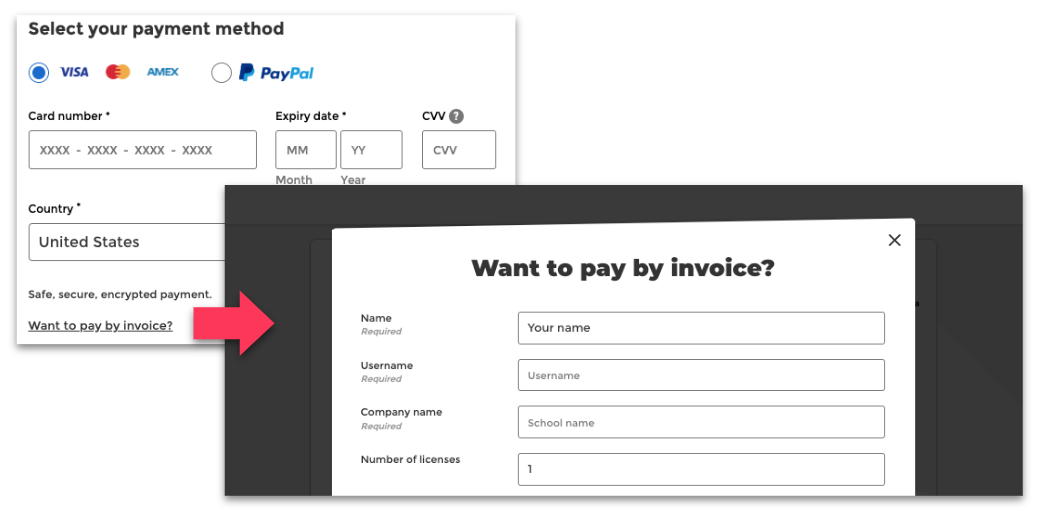
For web subscriptions that support pay by invoice, you can choose to “pay by invoice” when starting your subscription. This option is only available on a few select plans. Please check if this option is mentioned on the feature list of your subscription. If you proceed with a manual invoice request, you will initially receive by email a $0 invoice for a temporary trial. Within 1-3 days, our team will manually create a new invoice with the invoicing details you submitted. This new invoice must be paid within 30 days. Invoices can be paid via the following payment options:
-
- Debit/credit card (Visa, Mastercard, American Express)
- PayPal
- EFT/EBT (Electronic Funds/Bank Transfer)
- Check (for invoices over $240 USD)
- ACH, EEF, and EHF payments may be available on a case-by-case basis (please reach out to see if we are able to make an exception for you)
How is my location determined?
Our billing system uses a few different factors to determine your location. This could be the issuing bank location, address details, IP address, or more.
What if I'm not in my home country when I purchase?
Show more
At this time, we are unable to process feature subscription payments from the providers listed below:
|
Klarna |
WeChat Pay | Google Pay |
|
UnionPay |
Diners Club | Apple pay* |
|
JCB |
Neteller | Samsung Pay |
|
Alipay |
Vipps | Amazon Pay |
|
Skrill |
Venmo | Square |
*Apple Pay is only available via the Safari browser.
We may expand payment methods in the future.